Services and community
Nonprofit fundraising video ideas: a pantry campaign from ask to update
A food pantry campaign with six video ideas, a cooler appeal, volunteer shifts and an honest results update that protects the people it serves.
For small US accounting firms, enrolled agents and tax preparers, this calendar turns client questions into short videos. You get a posting plan, six explainers, an advertising checklist and a brief for an invented practice. Dates are ordinary federal examples checked for 2026. Before posting, check current rules, state deadlines and special relief. This is marketing guidance, not tax or legal advice.
Use this as a production schedule, not a complete tax calendar. Publication 509 distinguishes calendar-year and fiscal-year filers and adjusts ordinary deadlines for weekends and legal holidays (IRS calendar). Check current rules and relief before each dated post. Keep your document cut-off visibly separate from the IRS deadline.
For clients making individual estimated payments, show the usual January 15 date for the previous year (IRS payment periods).
Address only that audience. Verify exceptions and the year; do not tell every self-employed viewer that a payment is due.
Send a document-checklist video with appointment confirmations: income forms, prior return and identification.
Link your fuller intake list. Tell clients to use your established private document-delivery method, never public comments.
Announce the filing opening only after the IRS does. Its 2026 opening was January 26 for 2025 individual returns (IRS announcement).
Put the filing year on screen. Draft the booking message early, then review it again when the opening is confirmed.
Show your real appointment sequence: document intake, questions, review and signature.
Use an empty folder and labelled cards. Add how to report a missing form; avoid promising a completion date.
Make an entity-specific reminder: 2025 calendar-year partnership and S corporation returns were due March 16, 2026 (Form 1065; Form 1120-S).
Name the entity and form. Add your own document cut-off; do not reuse this clip for every company or next year.
Explain filing versus paying: an individual filing extension does not extend the payment deadline (IRS).
Show two separate cards, “File” and “Pay”. Invite viewers to discuss their own situation privately, rather than posting a calculation.
Publish actual appointment availability and intake options. The ordinary individual deadline was April 15, 2026 (IRS).
Say “documents needed by [your date]”; label it as your office cut-off. Remove booking messages when slots are filled.
Explain the next step for clients on extension: identify missing documents and arrange a follow-up.
Avoid a public “we are still working on your return” message. Send individual status updates through your normal private channel.
Explain bookkeeping clean-up using invented entries: a duplicate expense, an uncategorized transaction and a missing receipt.
Offer a review appointment only if you provide it. Use fictional records instead of a screenshot from a client account.
For ordinary individual extension filers, show October 15 in the 2026 example (IRS extension reminder).
Ask for outstanding documents by your internal cut-off. Check special relief before stating that this date applies to everyone.
Invite next-season intake and year-end review appointments; publish holiday hours separately.
Prepare evergreen document and process videos now. Leave next season’s dates unpublished until you can verify them.
Answer one question per video with form names or process cards. Link the fuller checklist and review wording under current professional rules.
Show “Return filing” beside “Tax payment”. For ordinary individual returns, the extension covers filing, not paying (IRS). Do not suggest that viewers can wait to calculate what they owe.
Try this: Publish before your intake cut-off. Add the current IRS link and a private appointment route.
Show one payment period with its usual due date from the IRS table (payment periods). Make a separate clip for each period rather than squeezing the whole schedule onto a small screen.
Try this: Ask clients already making estimated payments to check their plan with you. Leave personal amounts out of the video.
Show an intake checklist with one unchecked item. Explain your own policy for incomplete files: whether to keep the meeting, contact the office first or arrange another date.
Try this: Adapt the Service offer template (Checklist version), an example brief and storyboard, for this question.
Service offer · Checklist typeUse the preparer’s name, accurate designation and service scope. Enrolled agents must not describe their designation as “certified” or imply IRS employment (31 CFR 10.30); check current rules.
Try this: Use a plain name card. If you record a team introduction yourself, keep it separate from the text-only procedural brief.
Announce one concrete change: a new location, appointment hours or the person handling document intake. Give the effective date and booking action; do not imply an IRS endorsement.
Try this: The Now open template (Calm and clear version) is an example brief and storyboard for a measured announcement.
Now open · Calm and clear buildList your actual pricing inputs, such as the service requested and forms involved. Ask for details through your normal private intake route; do not invite people to disclose income in comments.
Try this: Explain the quote process if you are not ready to publish a fee schedule. A service-scope card is more useful than an unexplained “from” price.
For practitioners covered by Circular 230, §10.30 bars false or misleading communications about IRS matters. Check the current rule and how it applies to your role (eCFR). Do not treat this as legal advice or as the complete rulebook for every accountant.
A covered practitioner cannot charge above published rates for at least 30 calendar days after the fee schedule’s last publication. Fee information must disclose responsibility for costs where costs may arise (§10.30(b)); check current rules. Review scheduled reposts before changing prices.
For covered direct-mail and e-commerce communications, retain the actual message and a list or description of recipients for at least 36 months from last transmission or use (§10.30(c)); check current rules. Save the video, caption, distribution details and dates. Ask your compliance adviser what records your social posting requires.
The IRS warns taxpayers about refund-percentage fees and larger-refund claims (preparer guidance). Describe your service instead. Before using testimonials, check current rules for your credentials and jurisdiction; permission alone is not a compliance review.
Larkfield Tax & Books is an invented practice. This adapts the Service offer template (Checklist version), an example brief and storyboard. The clip points to a fuller intake list.
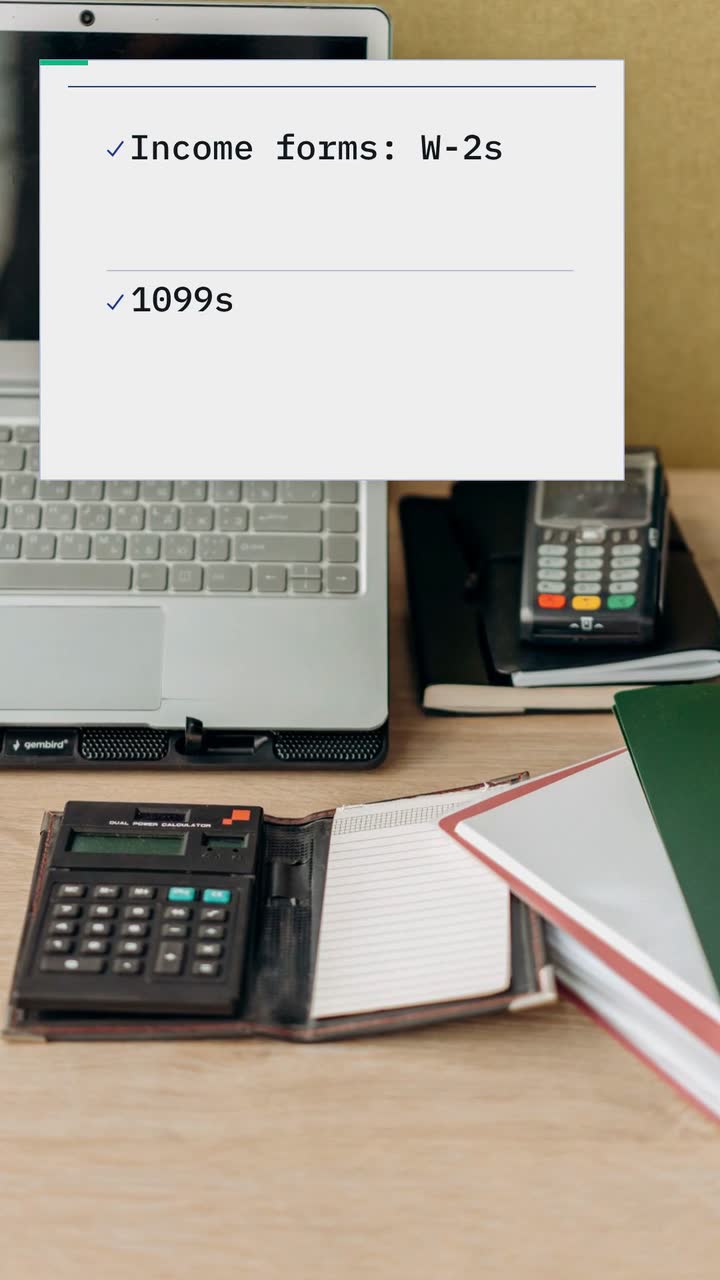
A 15 s appointment checklist for Larkfield Tax & Books, 9:16 vertical, calm type style. Use text and drawn checkmarks over a stock photo of a tidy desk with documents. Colours #1e3a8a, #10b981 and #f8fafc. Show three reminders: income forms such as W-2s and 1099s, last year’s return, photo ID. Narration in English, concise: “Tax appointment coming up? Gather your income forms, last year’s return and photo ID. Check our full list. Confirm with Larkfield Tax & Books.” Close on the firm’s name and “Confirm your appointment”.
| When | On screen | Why |
|---|---|---|
| 0–3 s | “Tax appointment coming up?” with “Larkfield Tax & Books” in navy text on the pale background. | Identify the office and the appointment question without a refund claim. |
| 3–6 s | “Income forms” with smaller “W-2s / 1099s” and a green drawn checkmark. | Give the first document category room to read; never show a real form. |
| 6–9 s | “Last year’s return” with a drawn checkmark. | One short label, held while the narration moves to this item. |
| 9–12 s | “Photo ID” and then “See the full list”. | The caption supplies the fuller checklist; this clip is only a reminder. |
| 12–15 s | “Larkfield Tax & Books · Confirm your appointment”. | Finish with the business’s own close; put its actual booking link in the post. |
| Outro | The ProcVideos outro closes the video. | |
This brief is text only. Add the full intake list and private delivery instructions to the post. With narration, the output includes an SRT file in the narration’s language. Each generation differs: review spelling, pacing and any tax wording, then regenerate with feedback if needed. Videos Creator is coming soon to Attain OS. See how it works.
Try a brief like this one
Videos Creator is coming to Attain OS. You can create your Attain OS account today.
Assign someone to review tax wording before scheduling. Track useful responses, such as booking confirmations or private requests for the document list.
Use only the reminders that fit your work. If you do not prepare returns, focus on monthly document hand-off, expense categorization and year-end records. Do not invite tax questions you cannot handle. A fictional transaction walkthrough can explain a bookkeeping service without implying tax expertise.
Reserve time before your workload peaks. November and December are a suggested window. Draft appointment and process clips first; hold dated reminders until official dates are available. Recheck intake cut-offs and availability before posting.
Prefer feedback about communication or organization, subject to permission and your current professional rules. A refund amount can imply a result another viewer should expect. Check current rules for your credentials and jurisdiction before publishing; this is not legal advice.
Explain what the quoted service includes and which facts affect the quote. If you publish rates as a practitioner covered by Circular 230, check the current fee and cost-disclosure provisions ([§10.30(b)](source:5)). Use the same reviewed wording in the video and caption; remove outdated scheduled posts.
Use the content structure, not the US dates or designations. Rebuild the schedule from your own tax authority’s current calendar and professional rules. Keep each reminder specific to the return type and audience. Do not translate “enrolled agent” into a local credential that your staff do not hold.
Example templates
An example template is a sample brief and storyboard for one kind of video, in one style, format and length.
Rules and platform features change. Check the source before you rely on it.
Services and community
A food pantry campaign with six video ideas, a cooler appeal, volunteer shifts and an honest results update that protects the people it serves.

Services and community
A countdown with a purpose for each post, ideas for different events, and a night-market brief that keeps the date, place and entry details readable.

Health care
Turn front-desk questions into dental videos: explain insurance, visit costs and booking without exposing patients or promising treatment results.

Health care
Thirteen clinic video ideas built around reception questions, with consent checks, a posting plan and a focused microchip scan example.
Tell the Attain OS team what you want to make.
Videos Creator is coming to Attain OS. You can create your Attain OS account today.