Basics for everyone
How to write a video brief: a bike-shop promo, step by step
Turn a vague request into a usable video brief: follow a bike shop, plan the screen text and adapt eight examples to your business.
For small-business owners and creators weighing AI-generated video, customer trust starts with what the video asks people to believe. Is that your actual product, a real customer, or an illustration? Use this guide to choose the right visual, check disclosure rules and review a finished post. You will leave with five usable video ideas and a worked backpack brief. The research below concerns ads and product images; it does not establish how your audience will respond to a video.
Pause on anything a buyer might use to decide: a bag’s pocket, a rental’s window view, a repair result or a customer quote. Ask whether you have evidence for what the frame implies. A drawn diagram can also mislead if it adds an unsupported feature.
Inspect the finished video for changing product details, distorted hands, unreadable signs and inconsistent prices. These are review prompts, not a claim that every generated video has these faults. Even a flawless image is unsuitable as proof of an actual product if it invents the details. To check a clip someone else posted, see AI video or real?
Write a sentence naming the visual’s role: “This clip shows the actual bag” or “This animation summarizes its listed features.” If the video suggests more than that sentence can support, replace the visual or narrow the claim.
These sources examine still ads or product images, not a comparison of generated video and procedural animation. They measure reported perceptions or intentions, not completed sales. Their findings are no reason to hide required disclosures.
| Source | Test context | Finding and limit |
|---|---|---|
| NIM Insights, vol. 7 | Identical still ads described as AI-generated or human-made. | AI descriptions led to more critical ratings and lower engagement intentions. Responses varied with the product and existing trust in AI. |
| Wortel and colleagues (2024) | Still Instagram backpack ad; 161 participants recruited through a university and personal networks. | Disclosure lowered ad attitude; brand attitude fell only with high AI aversion. Source credibility was unchanged. This was not a representative customer sample. |
| Koning and Voorveld (2025) | AI-made still ad for an invented gym; 304 UK participants. | Disclosure reduced trust in the ad and organization. A smaller positive indirect effect involved perceived appropriateness; it did not erase the negative result. |
| Frontiers in Computer Science (2026) | Labeled product images: a power bank and perfume. | Total brand trust fell for the power bank. The analysis found a positive pathway to purchase intention, but no significant overall change in that intention. It did not measure purchases. |
Check the current linked policy and upload settings before posting. These summaries are not legal advice or a substitute for the full platform rules.
| Platform | What the official page covers | Publishing action |
|---|---|---|
| YouTube | Realistic AI-created or meaningfully altered content, including fabricated events or actions. The page also lists AI-generated music. | Use the AI use setting when required. Review the audio examples as well as the visual examples. |
| TikTok | Realistic AI images, audio and video require labels; broader AI labeling is encouraged. Some content remains prohibited even with a label. | Check the AI-generated content setting and the disclosure options on the help page. A label does not make prohibited content acceptable. |
| Facebook, Instagram and Threads | Photorealistic video or realistic-sounding digitally created audio; the examples include a reel with a realistic AI voice. | Use the required disclosure control. Check the voice even when the pictures are plainly animated. |
Consider an abstract seasonal background or a clearly fictional concept preview. Keep it separate from evidence of what customers will receive. A fantasy hiking scene is not proof that your bag survived that trip; an imagined café is not a tour of your premises.
For color, fit, texture, room layout or a completed repair, use your own accurate photos or recordings in a separate post or your editing workflow. For a process or specification summary, consider labeled diagrams and type. Our product video guide helps turn those distinctions into a product post.
Choose the idea that answers an actual buyer question. Decide whether it needs a recording of the real thing or an explanatory graphic before making it.
Before a product launch, record your actual bag being packed with named items. Show the zip closing without a cut that hides the fit. Pair that demonstration with a separate graphic of verified dimensions.
Try this: Say: “Here is what we packed; check the dimensions against your own gear.”
When opening appointment slots, use a text-led diagram: describe the fault, receive an assessment, approve the quote. Check that the steps match your shop’s process; do not invent a successful repair to illustrate them.
Try this: Say: “An assessment comes before a repair quote.”
Before a holiday weekend, animate your shop name, confirmed opening hours and ordering cutoff. Use ordinary text rather than an imagined busy storefront. Check the same details against your booking or ordering page.
Try this: Say: “Order by the listed cutoff for this collection window.”
When customers ask about repairs, summarize the written policy: what is covered, what is excluded and where to read the terms. Use a checklist graphic; avoid a broad lifetime claim unless the actual policy supports it.
Try this: Say: “Read the coverage and exclusions before ordering.”
After a creator publishes a tutorial, make a follow-up explaining one claim you verified. Show your own test or name the source and its date. Separate what you observed from what the source reports.
Try this: Say: “This is what I tested; these conditions may differ from yours.”
List each price, feature, result and quotation beside its evidence. Mark invented-example details separately. Remove claims whose evidence is missing or out of date.
Watch without sound for implied product claims. Then listen to the narration and read all on-screen text. Check that a schematic has not become an apparent product demonstration.
Read the destination platform’s current policy, including synthetic audio and music. Use its required setting; add an explanation of the visuals or voice when useful.
Ask someone unfamiliar with the edit what is real, illustrated and offered. Fix any mismatch with your claim record. Save the approved file, caption and policy-check date together.
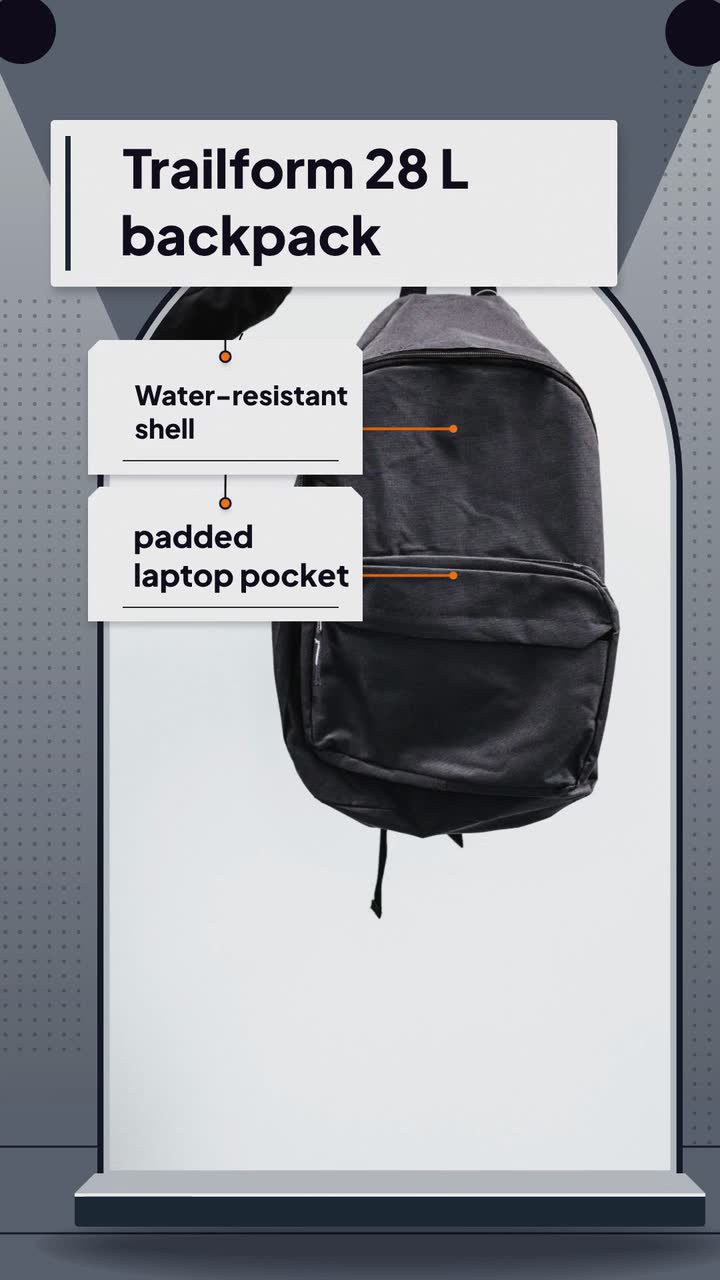
Trailform is an invented outdoor brand from the backpack example. This uses the Product hero template (Spec sheet version): an example brief and storyboard, not a promise of a template feature. Assume the fictional price, features and shipping offer have been checked.
Make a 15 s, 9:16 vertical video for Trailform’s 28 L backpack, priced at $129 with free shipping on every order. Highlight a water-resistant shell and a padded laptop pocket. Use a stock photo of a plain backpack and type in #1f2937, #f97316 and #f3f4f6. The photo stands in for the bag, so make no claim about what it shows. No narration. Open with the name and capacity, then show the features, price and shipping offer. Close with “Trailform — See product details.”
| When | On screen | Why |
|---|---|---|
| 0–3 s | “Trailform / 28 L backpack” over a stock photo of a backpack. | Identify the product without presenting the stock photo as the actual bag. |
| 3–9 s | “Water-resistant shell”, then “Padded laptop pocket”; the photo stays a stand-in. | Present the listed features without inventing their appearance or demonstrating performance. |
| 9–12 s | “$129 / Free shipping” on a clear price card. | Hold the price for reading. |
| 12–15 s | “Trailform — See product details.” | Finish with the business’s own close. |
| Outro | The ProcVideos outro closes the video. | |
Use only terms your real business can support. Publish any real bag demonstration separately; Procedural Videos takes a text brief, with no media uploads. For more detail, see writing a video brief.
Try a brief like this one
Videos Creator is coming to Attain OS. You can create your Attain OS account today.
Review the actual sound and pictures, not just the tool’s name. For example, Meta’s realistic synthetic-audio guidance includes AI voice narration. A schematic picture does not remove that audio requirement.
If accurate, an explanatory caption could say: “Illustrated feature summary; narration uses an AI voice.” Without narration, try: “Illustrated feature summary; see the product page for actual photos and specifications.” Neither sentence replaces a required platform control. Match the description to this version of the video; do not imply an AI voice is the owner or a customer.
[YouTube says](source:5) disclosure does not limit audience or monetization eligibility. Viewer reactions are a separate question; do not use the policy as a campaign forecast.
[YouTube exempts script assistance](source:5) from disclosure. Review any synthetic voice or generated imagery added later against the destination’s current policy.
Return to the customer’s original words. If you need a shorter version, ask them to approve the wording and its context. If there is no genuine customer statement behind it, leave it out; an AI disclaimer is not a substitute.
Check the actual product and your claim record. Correct or withdraw the misleading video, update the description and explain the correction plainly. Review other versions using that detail before you publish them.
Example templates
An example template is a sample brief and storyboard for one kind of video, in one style, format and length.
Rules and platform features change. Check the source before you rely on it.
Basics for everyone
Turn a vague request into a usable video brief: follow a bike shop, plan the screen text and adapt eight examples to your business.
Basics for everyone
A short routine for checking a clip you saw online, and what businesses can do so viewers believe the videos they post.
Health care
Turn front-desk questions into dental videos: explain insurance, visit costs and booking without exposing patients or promising treatment results.
Health care
Thirteen clinic video ideas built around reception questions, with consent checks, a posting plan and a focused microchip scan example.
Tell the Attain OS team what you want to make.
Videos Creator is coming to Attain OS. You can create your Attain OS account today.