How it works
From your idea to a finished explainer, promo or announcement.
Describe the video you need. ProcVideos uses AI to plan it and code to draw the motion graphics, with music and optional English or Spanish narration.
Leave your email. We’ll let you know when private beta opens. ProcVideos is part of Attain OS. No account, card or organization needed.
Real output: how this video was made
- Film
- How ProcVideos works
- Format
- YouTube 16:9
- Length
- 30 s
- Made by
- The Procedural Videos engine directly, not from a brief
playhead 04.9 / 30 s
YouTube 16:9 · 30 credits · 1080p · 30 fps MP4
Five steps
Brief
Say what the video is for, and pick a style, 9:16 or 16:9, and 10, 15, 20 or 30 seconds.
Plan
AI plans the video scene by scene and writes the script.
Code
Each scene is written as code: every shape, word and move on screen is drawn by that code.
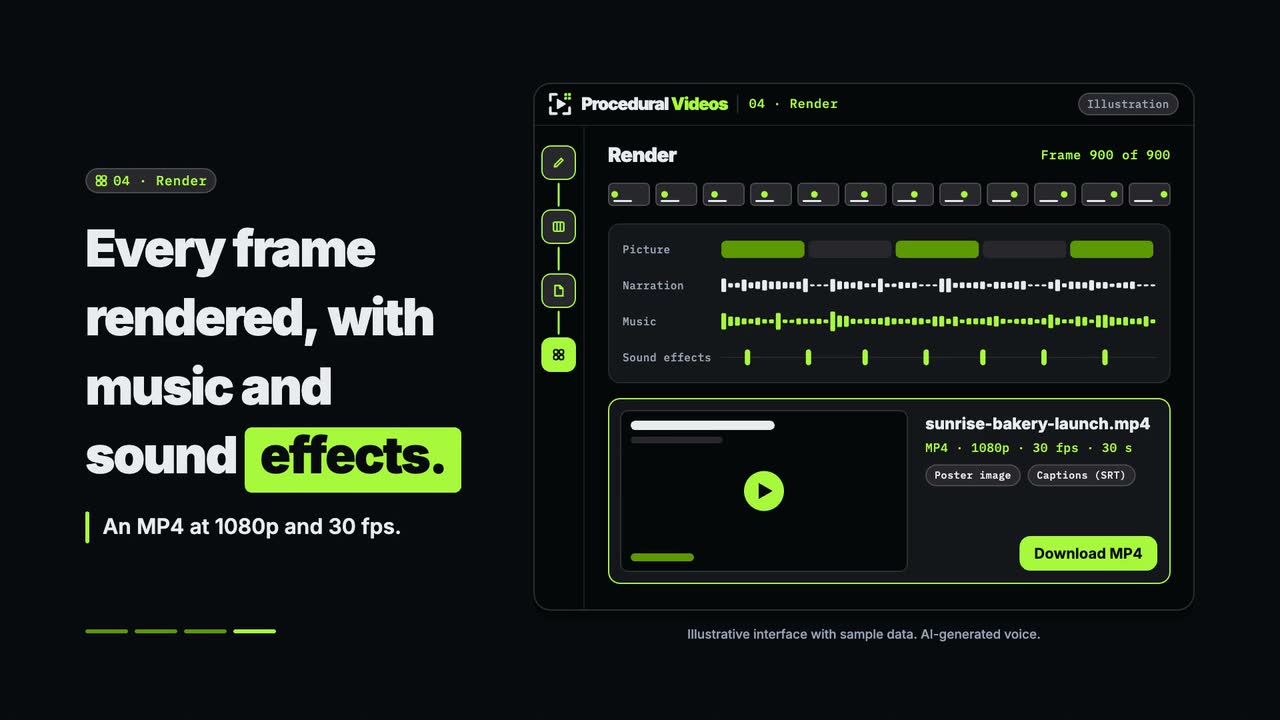
Render
The engine computes every frame and times music, sound effects and any narration to it.
MP4
You download a sharp 1080p MP4. Want a change? Regenerate it with feedback.
Why code
Motion graphics, not generated pixels.
Left, an illustration of generated pixels. Right, drawn by code.
- Every frame is computed from code: sharp at 1080p, no morphing or flicker.
- Text is exact and legible, in your brand colours.
- Regenerate with feedback for another take.
- Clear narration, read word for word, with captions, music and sound timed to the frame.
In every video
Two formats
Vertical 9:16 or YouTube 16:9.
Four lengths
10, 15, 20 or 30 seconds, priced by the second.
Music and sound effects
In every video, timed to the frame.
Optional narration in English or Spanish
With captions timed to it.
Styles
Build, poster, rush, toon, haunt and type.
An MP4 download
Sharp at 1080p, ready to publish anywhere.
Custom templatesComing soon to Attain OS
Your own templates
A template is a style of your own. Your organization keeps it and can use it for as many videos as you like, each at about 1 credit per second.
- Free
Save your adjustments
Adjust a style's controls, such as fonts, colours and speed, and save the result as a template.
- Uses credits
Have one designed
Answer a few questions about the look you want, such as colours, fonts and pace. You get a concept with stills, a short clip and variants to adjust, and you keep it once it passes automatic checks.
- Coming soon
Share it
Publish a template to a public library, after review. Templates there are free to use; each video costs its usual credits.
Why code?
Because the picture is computed by code, the words, the layout and the motion are exact: text stays legible in your brand colours, motion never morphs, and sound lands on the frame. Want a change? Regenerate with feedback and get a new take.
Styles and formats
Pick a style and a format.
AI writes each video as code for your brief, in the style you choose.
- build
Build
Bright and tactile: soft light and puffy interface pieces that assemble themselves on the beat.
- poster
Poster
Swiss-poster energy: bold type, hard cuts and grid wipes that snap on the beat, finished like print.
- rush
Rush
3D and fast: chrome, glossy tiles, particles and camera fly-throughs, with type that punches in.
- toon
Toon
Hand-drawn cartoon: wobbly ink lines, flat colour, squash and stretch, and comic lettering.
- haunt
Haunt
Dark and moody: the scene is revealed by light, with fog, embers and glowing type.
- type
Type
Kinetic typography: the words are the show, set in motion scene by scene.
Vertical 9:16
For short-form, phone-first feeds.
YouTube 16:9
For YouTube and anywhere widescreen plays.
Sound
Music and sound effects in every video, plus optional narration in English or Spanish with captions.
FAQ
Questions, answered
What is a procedural video?
A video drawn by code instead of filmed or edited. You describe what you want; AI plans the video, writes it as code, and the engine renders it with music and sound effects.
Is ProcVideos an AI video generator?
Yes, a procedural one. AI plans each video and writes it as code, and the engine renders every frame, so you get an AI video with no AI-generated footage: text stays legible and motion stays stable. It makes motion graphics, not realistic scenes of people or places.
How is it different from AI-generated video?
Every frame is computed from code rather than generated as pixels, so motion is continuous and stable with no morphing or flicker, text is exact and legible in your brand colours, and the output is sharp at 1080p.
How much does a video cost?
You pay with credits. 10 credits cost $1 and a video uses about 1 credit per second, so a 10-second video is about 10 credits, or about $1.
How much does an AI video cost by length?
At about 1 credit per second and 10 credits = $1: a 10-second video is about $1, 15 seconds about $1.50, 20 seconds about $2 and 30 seconds about $3.
What formats and lengths can I make?
Vertical 9:16 and YouTube 16:9, at 10, 15, 20 or 30 seconds.
Does the video have sound?
Yes. Every video gets music and sound effects, timed to the frame. You can add narration in English or Spanish, which also adds captions timed to it.
Can I revise a video?
Yes. Regenerate it with your feedback. Each generation is a new take, so you keep the one you like.
Are there free credits?
Yes: 60 free credits, once per organization, on any paid Attain OS plan.
Which plan do I need?
Any paid Attain OS plan. You can buy more credits at any time.
What can I do with my videos?
Use them for any lawful purpose, personal or commercial: edit them, add your own logo or footage in your own editor, post them on any platform, run them as ads and deliver them to your clients, who can use them the same way. You can't resell them as stock footage or as templates. Narration is an AI voice, so follow each platform's rules for labelling AI content. Videos with stock photos use photos from Unsplash under the Unsplash License. These terms are part of the Attain OS terms of service, which govern if the two differ.
Which styles are there?
Build, poster, rush, toon, haunt and type.
Is it a motion graphics video maker?
Yes. Describe the video in a sentence; AI plans it and code draws every frame as motion graphics: animated type, shapes and diagrams, with music and sound effects.
What kinds of video can I make?
Animated explainers, promo and launch videos, announcements, animated diagrams and infographic videos, kinetic typography (the type style), cartoons with comic lettering (the toon style) and 3D motion graphics (the rush style).
What do I get at the end?
An MP4 download, sharp at 1080p, to publish anywhere. Narrated videos also come with a captions file.
Can I make my own template?
Yes. Save a style you've adjusted as a template, for free, or have one designed from your answers, which uses credits. Your organization can use it for as many videos as you like.
Can I share a template?
Not yet. Sharing is coming soon: you'll be able to publish a template to a public library, after review. Templates there are free to use; each video costs its usual credits.
Is it available now?
Videos Creator is coming soon to Attain OS. You can create your Attain OS account today.
Have a video in mind?
Tell the Attain OS team what you want to make.
Leave your email. We’ll let you know when private beta opens. ProcVideos is part of Attain OS. No account, card or organization needed.