
Construction and trades
Contractor video marketing: show how you run a job
Show how you estimate, manage permits and handle changes. A practical video plan for general contractors, custom builders and fit-out firms.
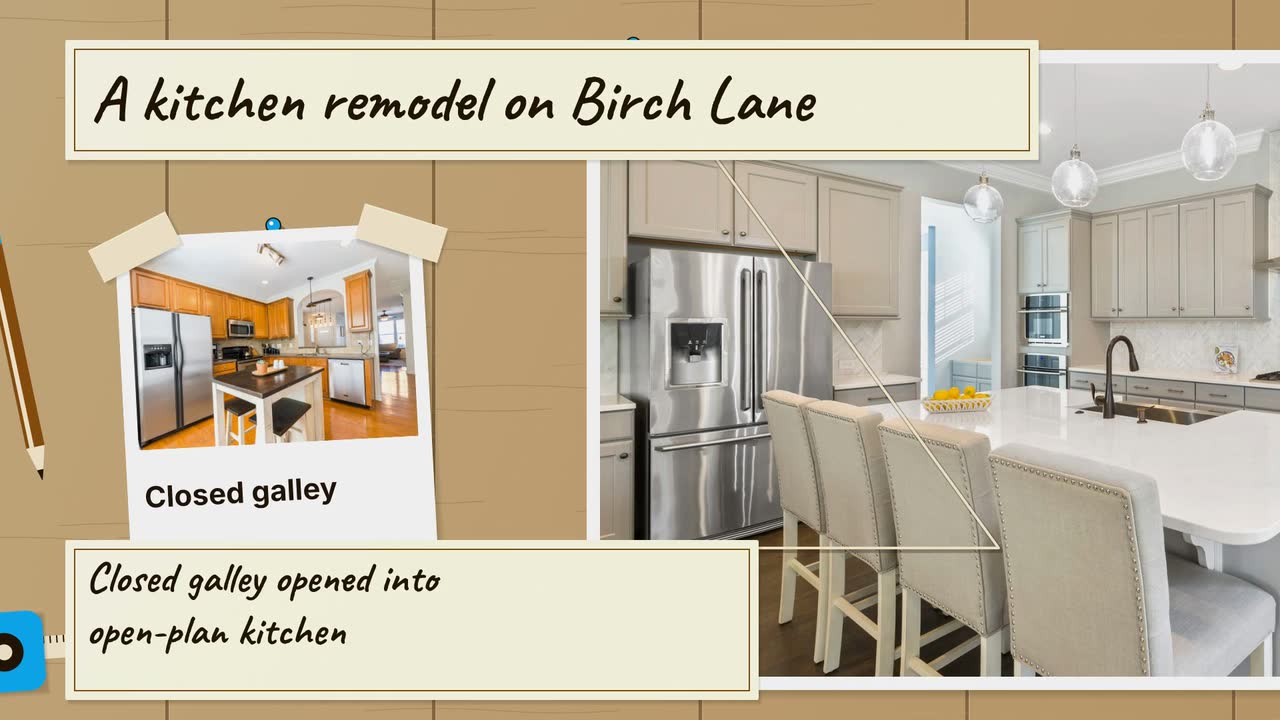
For small remodeling firms, this walkthrough shows how to make a remodeling project showcase video that explains a kitchen job without passing a drawing off as finished work. Follow Oakline Builders, an invented business, through a sample brief, a proposed storyboard, six project angles and a handover-to-post checklist. Use your own job records and permission-cleared photos alongside the illustration. The legal sources are U.S. guidance: check current rules in your jurisdiction; this is an editorial checklist, not legal advice.
Oakline Builders is an invented remodeling firm; this kitchen and its records are fictional teaching examples. Imagine a completed galley-to-open-plan remodel with quartz counters and an island. Instead of another polished-room montage, the owner wants to answer: what changed, what work came first, and what did the recorded duration include?
Choose the next project from your files: one with a clear scope, documented dates and images you can publish. Write a sentence separating the physical change from the homeowner's experience. For Oakline: 'We opened the kitchen to the dining area; the recorded site-work period was six weeks.' That sentence sets the boundary of the story, not a schedule for the next customer.
Use the Project showcase template (Build timeline version) as an example of a brief and storyboard, not a promise about a saved product feature. Oakline and the job are invented. The proposed drawing is a simple illustration, not an accurate floor plan or a reconstruction from photos.
Create a 30 s, 16:9 horizontal project video for Oakline Builders, an invented remodeler. Show an illustrated galley-to-open-plan kitchen with an island and quartz counters. Use simple shapes, labelled “Illustration · not to scale”. Phases: strip-out and preparation; services; cabinets and counters; finishes and handover. State “Six weeks on this job: demolition to handover”, including pauses during that period, excluding design and ordering. Do not promise that duration for other jobs. Use short labels and English narration. Close with “Book a design consultation · Oakline Builders”. Colours: #854d0e, #0ea5e9, #fefce8.
| When | On screen | Why |
|---|---|---|
| 0–3 s | “Oakline Builders · Kitchen remodel” over a cream background; a small “Illustration · not to scale” label stays visible. | Identify the business and the status of the drawing immediately. |
| 3–7 s | Simple kitchen and dining-area shapes open into a shared space; “Galley to open plan”. | Explain the scope without implying a technical structural plan. |
| 7–19 s | Four timeline labels appear in order: “Preparation”, “Services”, “Cabinets + counters”, “Handover”. | Give each phase room; omit procedural construction instructions. |
| 19–25 s | “6 weeks on this job” with “Demolition → handover”; then “Quartz counters + island”. | Keep the duration boundary visible and the material wording short. |
| 25–30 s | “Book a design consultation · Oakline Builders”. | Finish with the remodeler’s own invitation, held long enough to read. |
| Outro | The ProcVideos outro closes the video. | |
These are requested beats, not evidence of a generated output. Each generation differs; check the finished video and request another take with feedback if needed. The brief accepts text only, so keep job photos outside it. English or Spanish narration is optional; a narrated video includes an SRT caption file in that language. Videos Creator is coming soon to Attain OS.
Try a brief like this one
Videos Creator is coming to Attain OS. You can create your Attain OS account today.
Pick one angle per post. Show real footage or photos you have permission to use; if you draw the explanation instead, label it as an illustration. Each angle needs a detail from the job file, not a claim about every remodel.
Separate total project duration from the period when the household could not use the sink or cooker. Show a simple sequence of disconnected, temporary arrangement and usable again. Use recorded dates, and explain what “usable” meant on that job.
Try this: At handover, post: “Here is how this household managed without its kitchen sink.”
Explain one dependency: the appliance model was agreed before the cabinet layout was finalized. Show labels for the chosen appliance and the surrounding cabinet space; keep real dimensions out unless checked. Avoid offering installation instructions.
Try this: When a prospect asks about buying appliances first, share the job’s decision sequence.
Use a job where plumbing positions stayed put. Contrast what was retained with what changed: cabinet fronts, work surfaces or lighting. Do not describe it as cheaper without a documented, comparable scope.
Try this: At completion, caption it: “What we kept, what we replaced, and why.”
Explain the homeowner’s goal, such as seating or preparation space, and the chosen solution. A simplified drawing can describe the idea; it cannot establish that a particular clearance is suitable for someone else’s room.
Try this: During design enquiries, ask viewers which problem they want their island to solve.
Choose a documented discovery, such as damaged material, and show the sequence: finding, discussion, revised scope, work. Name the decision without blaming the homeowner or claiming every hidden condition is predictable.
Try this: After approval to share, post: “What changed after strip-out, and how we agreed the next step.”
Show an authorized real close-up of a finished junction, drawer alignment or a correction recorded on the final checklist. A drawn tick is only an explanation; it does not prove a defect was resolved.
Try this: After the correction is complete, pair the detail photo with a short account of the check.
Use this workflow after the handover check. Keep a private record of the evidence behind each published statement.
Pull the scope, materials and recorded dates from the job file. List exclusions such as appliance supply or decorating. State whether the duration includes site-work pauses and whether design and ordering sit outside it. Never substitute the quoted schedule for the actual record.
Show the client the proposed images, project description and any quote; ask where you may publish them. Keep their written response with the approved material. Omit the street by default. Check current local privacy and image-use rules; do not assume a short text resolves every permission issue.
Select one angle above, then write the scope, phase order, two supporting facts and the business’s close. Make a caption alongside the brief explaining what the drawing represents. Keep client records, photos and identifying details out of the text-only brief.
Read every label and listen to the narration. Reject invented measurements, a reordered construction sequence or an implied future completion promise. Check the illustration label and the consultation close. Regenerate with specific feedback, such as “remove the unsupported dimension”.
Choose real photos of the same job, ideally from matching viewpoints without concealing unfinished work. Caption them separately as project photos. Keep the illustration labelled; avoid a “before/after” pairing that compares an actual room with a drawn fantasy result.
Put the horizontal version on your website or YouTube. For Google Business Profile, an Update can contain video and an action button linking to a relevant page (Google). Link to your consultation information, and check the published post rather than assuming submission means it is visible.
For a 9:16 social version, request a 20 s video with one question, one supporting fact and your close. Shorten the story rather than squeezing the wide layout. The Project showcase example’s 3D reveal version is 16:9, so do not present it as a vertical preset. Track which post prompted each consultation enquiry.
| Detail | Where it belongs | Editorial decision |
|---|---|---|
| Project name | A descriptive name in the brief | “Open-plan kitchen” identifies the scope without revealing a street |
| Six-week duration | In the brief with its boundaries | This fictional job’s demolition-to-handover record, including pauses |
| Quartz counters and island | In the brief if documented | Material and feature, without performance claims |
| Price | Optional separate caption | Only with permission, scope, date and exclusions; no unexplained “from” price |
| License and insurance | A verifiable business-information page | FTC guidance recommends homeowners check these; verify current local requirements (FTC) |
| Client quote | Approved post text | Use the original words without changing their meaning |
| Job photos | Separate from the text-only brief | Document the real room; do not suggest the illustration recreates it |
In U.S. consumer guidance, the FTC recommends completion dates in written estimates and estimated start and completion dates in contracts (FTC). That is not a universal contract formula: check current local rules. In your video, label the period you actually measured; do not imply that “six weeks” includes design and procurement if it does not.
For older U.S. homes, EPA’s RRP requirements generally cover paid work disturbing paint in pre-1978 housing, with exclusions. Its contractor guidance says firms cannot advertise covered renovation work without firm certification (EPA). Before mentioning lead-safe work, check current applicability and certification with the relevant authority. Do not make a “lead-free” claim from the house’s appearance or age. This guide is not legal advice.
Do not treat winter as a universal planning season. Draft while the job details are fresh, publish once permissions and checks are complete, then reshare when enquiries in your own records show demand. Ask new callers which kitchen post they saw; that is more useful than assuming a season applies to your market.
You can choose to give context rather than hide it automatically. With permission, explain the scope, date and exclusions, such as owner-supplied appliances or work outside the kitchen. Separate the historical project cost from any current offer. If those boundaries need more words, put them in the caption or a linked project page.
Respect that choice. Removing the street alone may not make the job anonymous: a distinctive layout or story can identify it. Use a clearly labelled hypothetical process example instead, without their images, quote or recognizable details. Do not describe that example as a completed customer project.
It can explain phase order or a design choice, but it cannot document the actual finish. Use permission-cleared photos of the same room for a before-and-after record. If photos are unavailable, call the video a process illustration and leave completed-result claims out.
Example templates
An example template is a sample brief and storyboard for one kind of video, in one style, format and length.
Rules and platform features change. Check the source before you rely on it.
Construction and trades
Show how you estimate, manage permits and handle changes. A practical video plan for general contractors, custom builders and fit-out firms.
Construction and trades
For local roofers: storm-response posts, estimate explainers and replacement updates that show the work without promising insurance coverage.

Construction and trades
Turn job phases, planting questions and cleanup quotes into useful clips, with a local posting plan and an illustrated backyard brief.
Construction and trades
Turn deck design questions and real build milestones into a seasonal posting plan, without inventing prices, inspection results or finished projects.
Tell the Attain OS team what you want to make.
Videos Creator is coming to Attain OS. You can create your Attain OS account today.