Retail and products
Clothing brand lookbook video: one shirt, from line sheet to launch
Turn one linen shirt into a useful lookbook: a short storyboard, real fit evidence, six posting ideas and checks for fabric claims.
For independent clothing and accessories shops filming between customers, these boutique Instagram Reels ideas turn everyday retail work into useful posts. Choose a question, check your stock and film the evidence. Use the monthly calendar, practical shot lists, pre-posting checklist and cautions about markdowns and creator partnerships, plus a text-only brief for an invented shop. Help someone decide whether to visit or ask about a piece.
This is a suggested buying-calendar plan, not a posting quota. The clothing seasons follow a northern-hemisphere shop; move them to match your climate, deliveries and customers. Check local occasion dates before scheduling. Each month gets one anchor Reel; use the shot ideas below for extra posts.
Last-size rail: show the actual remaining winter pieces, grouped by size.
Read the rail before filming. Put the size beside each price and remove sold pieces from the planned shot list.
A gift edit with a scarf, a bag and a gift card, if you stock them.
Give each option its price and explain how the recipient can exchange a garment under your actual policy.
Unpack a confirmed spring delivery and feature one newly available piece.
Name its colour and size range. Say “available now” only after stock is checked and ready to sell.
Dress a hanger for a specific occasion, such as an outdoor wedding.
Show the fabric, lining and a coordinating layer. State the outfit total if you show several priced pieces together.
Build a gift selection for a locally relevant occasion.
Work back from your pickup deadline. Show the wrapping only if it is included, or state its extra charge.
Lay out a travel capsule from pieces you actually carry.
Pair each top with the same trousers and show the combinations. Describe the garment measurements, not an untested packing claim.
Explain one summer markdown rail rather than a storewide offer.
Show which pieces qualify, their available sizes and the end date. Keep exclusions beside the offer.
Preview a confirmed delivery of transitional layers.
If timing is still an estimate, label it “expected”; do not promise the supplier’s date.
Film the fall collection as a sequence of garment details.
For a separate animated price-card example, see the Product hero template (Lookbook version); it is a brief and storyboard example, not a way to reproduce your garments.
Style the same sweater for work, a weekend and an evening out.
Keep the sweater in every frame. List the accessories separately so viewers can tell what the sweater price includes.
Show what a local shopping visit will involve: a gift-wrap station or a styling appointment.
State any booking requirement and fee. Do not advertise a complimentary service unless you can actually provide it.
Film a gifts-under-$50 selection and explain your ordering cutoff.
Distinguish dispatch from delivery. See holiday promo planning for organising the final shopping weeks.
Film real fabric, fit and construction with your phone. The animated example below communicates an offer, not a garment’s appearance. Answer one question per Reel.
Lay it flat with the waistband straight and measure from the top edge to the hem. State the size measured and the unit. A length measurement helps viewers compare it with a skirt they already wear.
Try this: Show the tape and say “Length of this size M: …” using the measurement you took.
Show the inside, the lining and the sleeve separately. If you demonstrate the fabric against light, keep the setup consistent and explain what viewers are seeing; do not promise that it will look opaque on every wearer.
Try this: Open the garment on the counter before the exterior shot, so the answer appears immediately.
Open a box, select a piece and match it to the stock record. Show its label and available colours. Keep unopened cartons out of the claim: you do not yet know which sizes are ready.
Try this: Finish with the purchase route and ask viewers to name the item and size in any enquiry.
Film the cuff texture and then the composition label. Use the label’s wording: a linen blend is not necessarily pure linen. Keep the camera colour setting consistent instead of using a filter that changes the shade.
Try this: Read the fibre composition, and direct shoppers to the listing for the care instructions.
Use your own phone and show it going into the pocket. Mention the phone model or dimensions you tested. Close the bag so viewers can see whether the fit changes when it is fastened.
Try this: Avoid “fits any phone”; invite shoppers to compare their device with the dimensions shown.
Film your entrance and a rail that represents your current range. Put the shop name, location and opening hours on screen. Keep this as a standalone introduction rather than a long preamble to each garment demonstration.
Try this: The Channel intro template (Instagram Reels intro version) is an example brief and storyboard for an animated introduction; use the business name as text.
Film the complete display, then the garments and their price labels. Check that each featured piece can still be bought; a display sample is not proof of stock in every size.
Try this: Post after the display changes. Include the item names so a visitor can ask for the right piece.
Check the finished video against your stock record before publishing a conflicting price or size.
These U.S. FTC guides are a starting point, not legal advice or a substitute for local consumer rules. Check the current rules where you sell before publishing a price comparison or limiting returns.
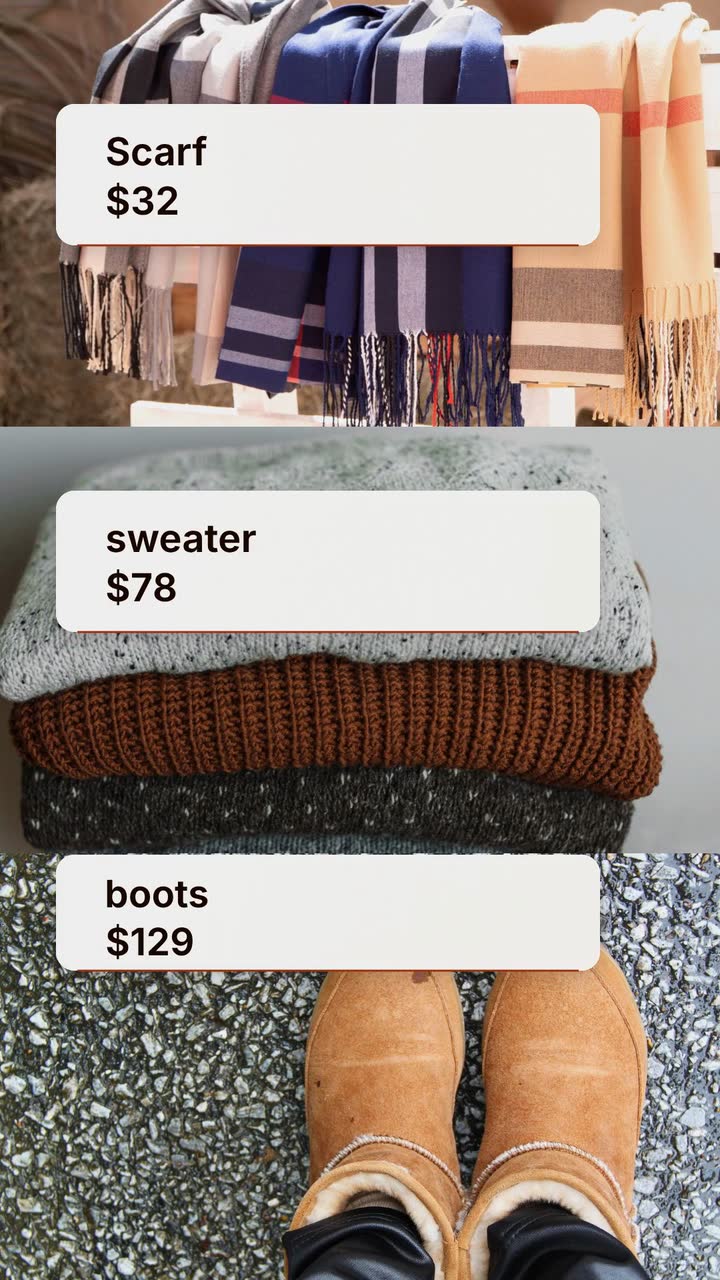
Ivy Lane Boutique is an invented U.S. shop. Its fictional offer applies only to the scarf-and-sweater pair, with no code required. The Seasonal store template (Fall version) is an example brief and storyboard, not a promise of a product feature. Keep the animated cards separate from your real garment demonstrations.
Make a 15 s, 9:16 fall offer video for Ivy Lane Boutique in poster style. Colours: #9a3412, #facc15 and #fff7ed. Use drawn leaves and text cards, not garment likenesses. Show “Plaid scarf $32”, then “Knit sweater $78”. Keep “Buy both: $95 · Ends Nov 26, 2026” visible from the start. No coupon needed; this offer is for this pair only. End with “Shop in store · Ivy Lane Boutique”. No narration.
| When | On screen | Why |
|---|---|---|
| 0–2 s | “Ivy Lane fall pair” above a plaid band. “Buy both: $95 · Ends Nov 26, 2026” remains on screen through the offer. | The price and deadline accompany the offer from its first appearance. |
| 2–6 s | A drawn card reads “Plaid scarf $32”. The pair offer stays visible. | Hold one item name and price long enough to read. |
| 6–10 s | A second card reads “Knit sweater $78”. The pair offer stays visible. | The two regular prices total $110; the fictional pair price saves $15. |
| 10–15 s | “Shop in store · Ivy Lane Boutique” with both item cards and the pair offer. | Leave the business’s own close on screen for the final beat, with no new paragraph of terms. |
| Outro | The ProcVideos outro closes the video. | |
This brief is text only: garment photos, footage and logos do not go into it. The animation describes the offer, not the real fabric or fit. Each generation differs; regenerate with specific feedback if a price or condition needs correction. Videos Creator is coming soon to Attain OS.
Try a brief like this one
Videos Creator is coming to Attain OS. You can create your Attain OS account today.
Try one arrival Reel and one answer to a customer question about that delivery. This is a trial schedule, not a reach claim. Note which pieces prompt enquiries or visits and whether you can handle the messages. Add a post when you have another useful detail.
Put the price beside the item it belongs to. If the sweater is $78 but the scarf is extra, label both or say “sweater only”. For a complete-outfit offer, show what is included and the total. Review old price posts when prices change; do not leave an expired deal presented as current.
A hanger shows the garment, not how it fits a body. Compare measured dimensions with the size chart and explain the basis of your recommendation. If a consenting staff member demonstrates it, name the size worn and distinguish their personal preference from a rule for all shoppers. Avoid guessing from the label alone.
Use them for prices, collection names and offer terms. Use your own filming for shade, seams, lining and fit. Keep a link or buying route to the actual item alongside the offer, and never present a drawn shape as a faithful product image. The two kinds of post answer different customer questions.
Example templates
An example template is a sample brief and storyboard for one kind of video, in one style, format and length.
Rules and platform features change. Check the source before you rely on it.
Retail and products
Turn one linen shirt into a useful lookbook: a short storyboard, real fit evidence, six posting ideas and checks for fabric claims.
Retail and products
Plan videos around fit, materials, watch condition and gifting deadlines, with careful product wording and a worked watch-shop brief.
Basics for everyone
Turn a vague request into a usable video brief: follow a bike shop, plan the screen text and adapt eight examples to your business.
Retail and products
Turn product listings and customer questions into twelve useful clips: fit, compatibility, accessories, care and bundle prices.
Tell the Attain OS team what you want to make.
Videos Creator is coming to Attain OS. You can create your Attain OS account today.