Creators and influencers
TikTok video ideas for small business: twelve posts from your shop floor
Turn repairs, restocks and counter questions into twelve TikTok posts, with a weekly trial plan and checks for disclosure, music and readable text.
For creators taking brand deals on YouTube, TikTok or Instagram, and small brands commissioning them, this guide turns a sponsor request into a usable video plan. You get a posting checklist, five formats worth pitching, a claims-review workflow and a sample hiking sponsor card. The legal examples use US FTC guidance; check the current rules for the markets you reach. This is practical editorial guidance, not legal advice.
Use this before posting, then again on the published version. For the legal points, check current rules: FTC guidance concerns US consumers, not a universal disclosure formula.
Ask for the product, campaign goal and intended buyer. Choose a question your audience asks: where the rain cover is stored or what fits inside the pack. If you cannot answer honestly, propose a factual announcement rather than a personal recommendation.
List each planned line, its evidence, your observations and the brand contact who confirmed it. “Includes a rain cover” needs a product check; “keeps everything dry in a storm” needs performance evidence. Approval is not substantiation (FTC guidance). Check current rules for regulated claims.
Record the destination, full video or excerpt, notice wording, review deadline and reporting date. Ask whether the fee covers only your post or also reuse in ads. Agree the permission period and who can change the cut; get advice on unclear contract terms.
Draft the transition, sponsor notice, audience question, answer and return to your usual content. Read it aloud. Move any feature needing another paragraph to a separate post.
Send on-screen words and the planned demonstration, including limitations. Request factual corrections together. Send the finished cut with its disclosure intact; check evidence again if revisions change a claim.
Check labels and links after posting; save screenshots. Report available metrics on the agreed date, stating the period and any paid distribution. Keep views separate from tracked purchases.
These platform requirements are separate from legal disclosure. Check current help pages and local rules before posting; activating a switch does not settle your legal obligations (FTC Q&A).
| Platform | The setting | What viewers see | Still up to you |
|---|---|---|---|
| YouTube | Select the paid promotion option in video details (YouTube Help). | YouTube adds a label at the beginning (YouTube Help). | Keep your relationship notice with the recommendation. |
| TikTok | Turn on commercial content disclosure (TikTok); select Branded content for a sponsor (TikTok). | Third-party branded content gets “Paid partnership” (TikTok). | Check permissions before tagging the partner; do not agree to ad use casually (TikTok). |
| Use the paid partnership label for branded content, including gifts and affiliate posts (Instagram Help). | The paid partnership label (Instagram Help). | Check eligibility and current in-app instructions; explain your relationship in the video. |
Check current disclosure rules. These examples help explain the relationship; no phrase is a legal safe harbour.
Pitch a question, shot list and posting occasion. These suggestions promise no reach improvement. Record demonstrations yourself; the sample card handles specifications.
Show what you put in the sponsored pack, including the item that does not fit. Film the closure with the actual load rather than displaying an empty bag. Post when you share the route plan; say “Here is what I packed for this walk”, not “It holds everything”.
Try this: Ask the brand to approve the shown model and capacity, not to remove your real limitation.
Show a buckle adjustment, pocket access or setup step you had to work out. Post once you can demonstrate it correctly. Introduce it as a first use, with the sponsorship notice; avoid scripting a long-term durability opinion from a new product.
Try this: Answer “How do I reach the rain cover?” with the actual pocket and your hand opening it.
Take a genuine question about the sponsored item, such as whether a bottle fits the side pocket. Film your answer with that bottle and state its size if relevant. Post the reply as a follow-up to the original deal, retaining the sponsor notice.
Try this: If you cannot check the answer, tell the brand what you need to test instead of guessing.
For a desk accessory, show the adjustment range you actually use and the point where it no longer suits your setup. Make this the sponsor section of a workspace tour, rather than a claim that it suits everyone.
Try this: Write the useful condition into the script: “This works with my setup because…” followed by the observed reason.
If the deal includes a discount, show the eligible item, exclusions and confirmed deadline together. Publish with enough time for your audience to act, then review the link when the offer ends. Keep a non-offer version ready if the brand changes the promotion.
Try this: Test the code on the eligible item and ask the brand who handles viewer questions about failed redemption.
Film what you actually do with the product. Drawings cannot establish fit, fabric feel or weather resistance. Reserve graphics for specifications or offer terms; use real recordings for tests. Do not depict rain running off a pack without evidence for the implied performance (FTC guidance). Check current advertising rules. YouTube also prohibits embedded advertiser-supplied video ads and commercial breaks (branded content policy); use creator-led explanations, and check the proposed edit against that policy.
For the rest of your posting schedule, use Reels planning for creators. To give sponsor episodes a consistent opening without turning the introduction into an ad, see YouTube intro planning.
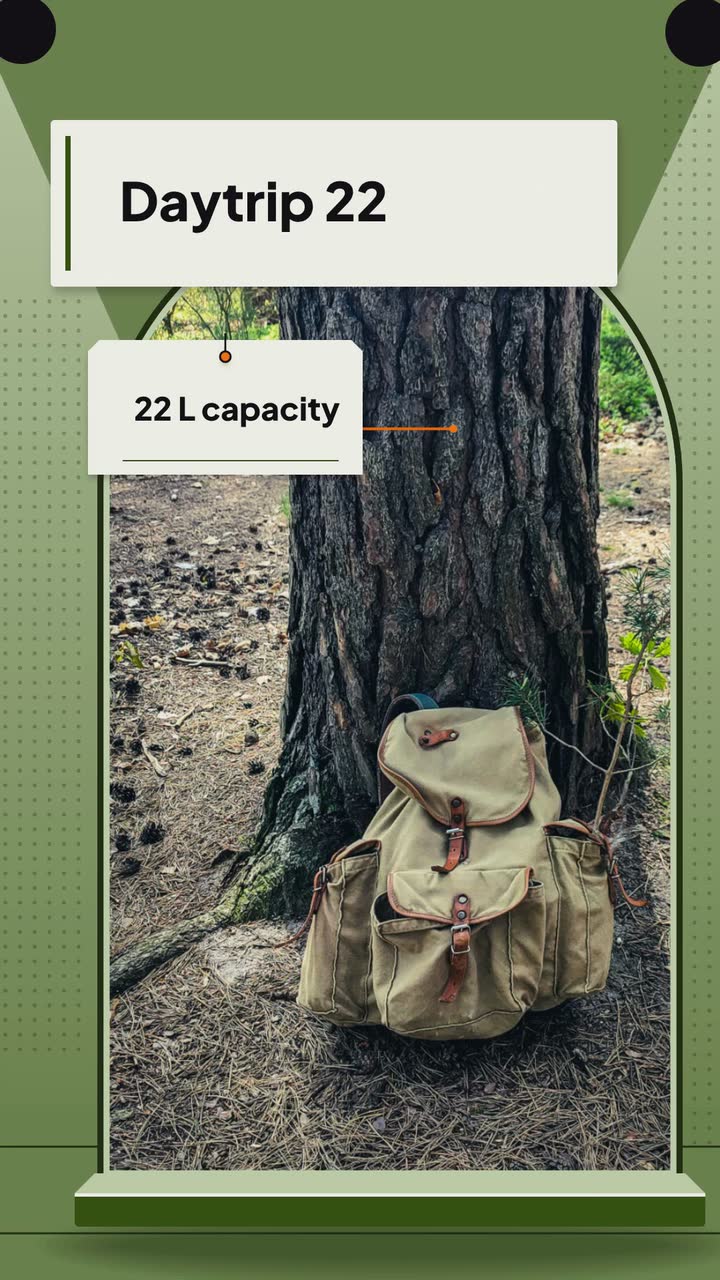
Trail Mix Tuesdays and Ridgeline Packs are invented. The creator films her packing demonstration separately; this 15 s vertical graphic supports her explanation in a short-form post. The Product hero template (Spec sheet version) is an example brief and storyboard.
Make a 15 s, 9:16 vertical specification card for invented backpack brand Ridgeline Packs and its Daytrip 22. Use the Product hero template, Spec sheet version. Colours: #365314, #f97316 and #f7fee7. Use a stock photo of a plain canvas backpack, with no weather test. Keep “Ad · Ridgeline Packs” visible throughout. Show Daytrip 22 first, then “22 L capacity”, then “Rain cover included”. Finish with “Explore Daytrip 22 · Ridgeline Packs”. No narration. The creator will record her own explanation separately.
| When | On screen | Why |
|---|---|---|
| 0–3 s | “Daytrip 22” over a stock photo of a canvas backpack; “Ad · Ridgeline Packs” appears in a contrasting band. | Introduce the model and relationship without filling the screen with a sentence. |
| 3–7 s | “22 L capacity” appears over the photo. The disclosure remains. | One specification gets its own reading time; the creator’s filmed packing is separate. |
| 7–11 s | Replace the specification with “Rain cover included”. Keep the disclosure. | Name an included accessory without implying waterproof performance. |
| 11–15 s | “Explore Daytrip 22 · Ridgeline Packs”; keep the ad band visible. | Close with the brand’s own invitation; no discount expiry to squeeze into this beat. |
| Outro | The ProcVideos outro closes the video. | |
All product details are invented for this example. Videos Creator is coming soon to Attain OS. Its brief is text only; the creator combines the downloaded MP4 with her recording in a separate editor. She discloses the paid relationship aloud while making her recommendation. Each generation differs: review the labels, specifications and reading time before using a take; regenerate with feedback if needed.
Try a brief like this one
Videos Creator is coming to Attain OS. You can create your Attain OS account today.
If you mention it, identify the gift ([FTC](source:1)). Check current rules for the audience you reach. Do not describe it as a paid deal if the gift was the only benefit.
Place it with the endorsement ([FTC](source:1)). As an editing precaution, repeat it at the sponsor segment’s entry and preserve it in any excerpt you publish separately. Check current rules rather than relying on viewers to have seen the opening.
Pause that line and ask for support. An endorsement cannot make a claim the advertiser cannot substantiate ([FTC guidance](source:10)). Check current rules; keep a factual specification or your accurately described observation instead.
It may not be understood. Explain that you earn from qualifying purchases, in the video and near the link ([FTC Q&A](source:2)). Check current guidance and match the wording to your actual arrangement.
Keep the post unpublished while you resolve it. Explain the relevant connection clearly ([material connections](source:11)); check current rules with an adviser if the brand disputes the requirement.
Match the endorsement: visual for visual, audible for audible, both for both ([FTC definitions](source:9)). Check current rules and preview the actual placement; readable text cannot compensate for a spoken notice buried under music.
Example templates
An example template is a sample brief and storyboard for one kind of video, in one style, format and length.
Rules and platform features change. Check the source before you rely on it.
Creators and influencers
Turn repairs, restocks and counter questions into twelve TikTok posts, with a weekly trial plan and checks for disclosure, music and readable text.
Creators and influencers
Twelve Reels to film around your niche: useful comparisons, repeatable series and clearly disclosed offers, with a vintage-shop example.
Creators and influencers
Open on a repaired bike, a finished dish or a review question. Choose a name card, series opener or text label, then test it against your current edit.
Creators and influencers
Turn an episode into a question, a guest quote and a clear listening invitation, without inventing a voice or promising a posting quota.
Tell the Attain OS team what you want to make.
Videos Creator is coming to Attain OS. You can create your Attain OS account today.