Compare
Procedural Videos vs AI avatar video tools
Synthesia and HeyGen turn a script into a video of an AI presenter: a stock avatar, or a digital twin made from your own footage. Procedural Videos has no presenter: AI writes the video as code, and the engine draws animated type, shapes and diagrams (the photo style adds a stock photo to each scene).
The short answer
Choose AI avatar tools when you need a talking presenter and you're comfortable with an AI person on screen.
Choose Procedural Videos when the message works as words, steps and numbers, and you'd rather show no synthetic person.
Compare
The difference, explained
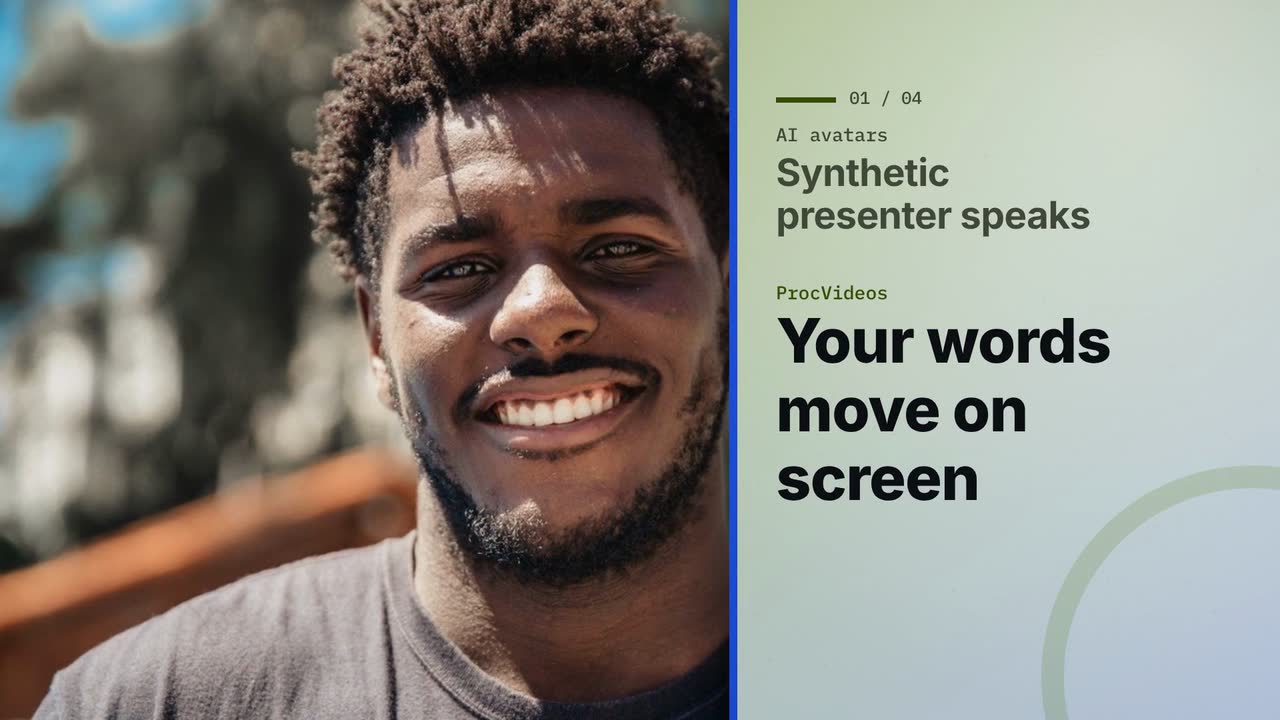
Real output: how this video was made
- Title
- AI avatars vs ProcVideos
- Brief
A calm, fair 30-second explainer for marketers who want a video without filming. It compares AI avatar tools, where a synthetic presenter speaks your script, with ProcVideos, where your message moves on screen over real stock photos, drawn by code. Use this on-screen text and narration exactly as written, one scene each, in this order. Title scene. On screen: AI avatars vs ProcVideos Narration: Two ways to make a video without filming. 1. On screen: Synthetic presenter speaks | Your words move on screen Narration: Avatars speak your script; ProcVideos moves your words. 2. On screen: Face reads your script | Real photos set scene Narration: A face reads aloud; real stock photos set the scene. 3. On screen: A presenter-led video | A motion-graphics video Narration: One is presenter-led, the other is motion graphics. 4. On screen: Film one sentence, then add ProcVideos clips Narration: Or film one sentence yourself, then add ProcVideos clips. End card. On screen: Compare at procvideos.com Narration: Compare at procvideos dot com. Rules. The only brand named anywhere is ProcVideos, written exactly like that, as one word. Name no other product or company on screen or in the narration; speak about the other side only as a category. Never write or say "Procedural Videos", and never use "code" as the name of our side: the product is ProcVideos. Photos. Every scene shows a real stock photograph: a head-and-shoulders portrait of one smiling everyday person facing the camera in bright light, for example "head and shoulders portrait of a smiling woman facing camera, bright office". Never hands only, a silhouette, a person from behind, a dark room or an extreme close-up. The pictured people never speak or endorse anything. No statistics, no prices. Keep it calm and fair: never mock the first side.
- Style
- Photo
- Format
- YouTube 16:9
- Length
- 30 s
- Narration
- English
- Music mood
- Calm
- Made by
- Procedural Videos, from this brief (the preview is a plain cut of its output)
The product form also asks for a short title and one of eight music moods. The AI planner wrote the on-screen lines and the call to action.
01Brief
A calm, fair 30-second explainer for marketers who want a video without filming.
See the full brief
A calm, fair 30-second explainer for marketers who want a video without filming. It compares AI avatar tools, where a synthetic presenter speaks your script, with ProcVideos, where your message moves on screen over real stock photos, drawn by code. Use this on-screen text and narration exactly as written, one scene each, in this order. Title scene. On screen: AI avatars vs ProcVideos Narration: Two ways to make a video without filming. 1. On screen: Synthetic presenter speaks | Your words move on screen Narration: Avatars speak your script; ProcVideos moves your words. 2. On screen: Face reads your script | Real photos set scene Narration: A face reads aloud; real stock photos set the scene. 3. On screen: A presenter-led video | A motion-graphics video Narration: One is presenter-led, the other is motion graphics. 4. On screen: Film one sentence, then add ProcVideos clips Narration: Or film one sentence yourself, then add ProcVideos clips. End card. On screen: Compare at procvideos.com Narration: Compare at procvideos dot com. Rules. The only brand named anywhere is ProcVideos, written exactly like that, as one word. Name no other product or company on screen or in the narration; speak about the other side only as a category. Never write or say "Procedural Videos", and never use "code" as the name of our side: the product is ProcVideos. Photos. Every scene shows a real stock photograph: a head-and-shoulders portrait of one smiling everyday person facing the camera in bright light, for example "head and shoulders portrait of a smiling woman facing camera, bright office". Never hands only, a silhouette, a person from behind, a dark room or an extreme close-up. The pictured people never speak or endorse anything. No statistics, no prices. Keep it calm and fair: never mock the first side.
02PlanAI planner
- format
- 16:9
- length
- 30 s
- narration
- Yes
03Drawn by code
- style
- Photo
- colours
#4A7200#1F4FD1#F5F7EF
04Frames1 tick = 1 s ≈ 1 credit
playhead 05.6 / 30 s
- credits
- 30
05MP4
30 s
1080p · 30 fps MP4
- credits
- 30 ≈ $3.00
Side by side
| Topic | AI avatar tools | Procedural Videos |
|---|---|---|
| On screen | An AI presenter: a stock avatar, or a digital twin of you.1,2 | Animated type, shapes and diagrams, and stock photos in the photo style. No presenter. |
| The script | The avatar speaks the script you write.1 | The AI writes the on-screen lines and, if you want narration, a script read word for word. |
| Voice | The avatar's AI voice.1,2 | Optional narration in English or Spanish, an AI voice, with captions timed to it. |
| Labels | A realistic synthetic person: YouTube and TikTok ask creators to label realistic AI content.3,4 | No generated person or footage. Narration, when you add it, is an AI voice: follow each platform's rules. |
| Output | A presenter-led video.1 | A 10, 15, 20 or 30 s MP4 at 1080p, 30 fps, in 9:16 or 16:9, with music and sound effects. |
Where Procedural Videos is better
No synthetic person
Nothing on screen imitates a human. Viewers get your message as type and motion, not a generated face.
Made for short social video
Vertical 9:16 or YouTube 16:9, at 10, 15, 20 or 30 s, with music and sound effects in every video.
Your colours in motion
Colours come from the hex values in your brief, and text stays sharp and legible at 1080p.
Where it falls short
No presenter
If the video needs a face explaining something, it can't provide one. Film yourself, and cut in procedural clips.
Narration in English or Spanish only
Narration is optional and comes in English or Spanish, in no other language. Without it, the words on screen carry the video.
Short pieces
Videos are 10, 15, 20 or 30 seconds, not long training modules.
When to use which
Use AI avatar tools for
- Presenter-led training and onboarding
- A talking-head update without filming
- One presenter message in many languages
Use Procedural Videos for
- Short announcements, launches and offers
- Explainers where the steps matter more than a face
- Social clips with music, sound effects and captions
Use both
A real face beats a synthetic one
If the video needs a person, make it you. A phone clip of you talking, cut with procedural clips for the steps and the offer, gives a video where the face is real and the graphics are drawn by code: no AI-generated person, no AI-generated footage.
- Filmed by you0–8 sYou, on cameraSay who it's for and why, in your own voice.
- Procedural clip8–18 sA 10 s procedural clipThe steps, as animated type in your colours.
- Filmed by you18–30 sYou, showing itYour hands on the product, or your screen.
- Procedural clip30–40 sA 10 s end cardThe offer and where to go next.
Cut it together in any video editor. Procedural Videos makes the clips; it does not edit your footage.
If you add narration, it is an AI voice: follow each platform's AI-content labeling rules.
Questions
Can Procedural Videos make an avatar or a talking head?
No. It makes motion graphics drawn by code. No one on screen speaks: people appear only in stock photos, in the photo style.
Does it have a voice?
Optional narration in English or Spanish: an AI voice that reads, word for word, the script the AI writes, with captions timed to it.
Can I put my own recording in the video?
Not inside Procedural Videos: a brief is text only. Download the MP4 and cut it together with your recording in any video editor.
Sources
Facts about other products come from their public pages, checked on 29 September 2026. Plans and features change, so check the vendor's page before you decide.
Have a video in mind?
Tell the Attain OS team what you want to make.
Videos Creator is coming to Attain OS. You can create your Attain OS account today.
Synthesia, HeyGen, YouTube, and TikTok are trademarks of their owners. Procedural Videos is not affiliated with, endorsed or sponsored by them.