Compare
Procedural Videos vs Adobe's video apps
Adobe covers every step: Premiere edits footage, After Effects animates motion graphics with keyframes, Express fills templates, and Firefly generates clips. Procedural Videos does one job: from a brief, AI writes a short motion-graphics video as code, and the engine renders it.
The short answer
Choose Adobe when you need full control: a professional edit, hand-built animation or generated shots, and you have the time and skills.
Choose Procedural Videos when you need a finished motion-graphics clip from a sentence, without animating it yourself.
Compare
The difference, explained
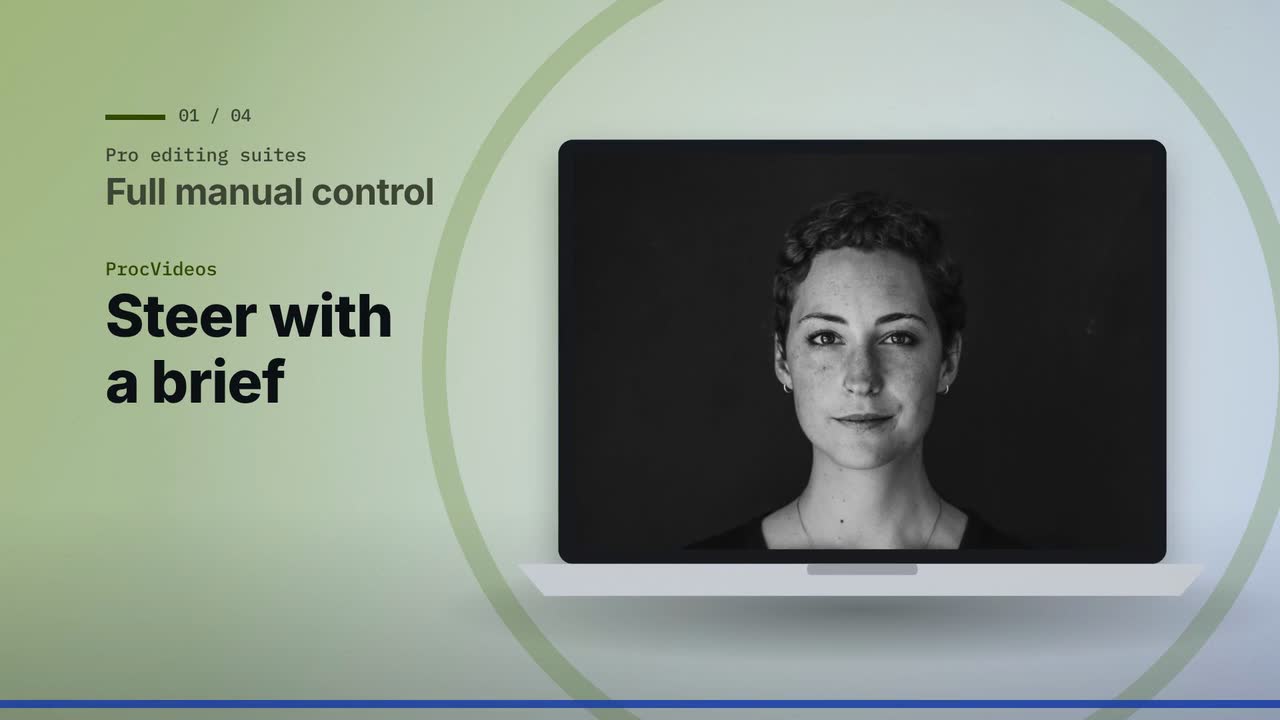
Real output: how this video was made
- Title
- Pro editing suites vs ProcVideos
- Brief
A calm, fair 30-second explainer for teams choosing between a professional editing suite and a faster route for short brand clips. It compares professional editing and motion suites, where you control and animate every layer yourself, with ProcVideos, where AI plans the video from a brief and animates it. Use this on-screen text and narration exactly as written, one scene each, in this order. Title scene. On screen: Pro editing suites vs ProcVideos Narration: Two ways to make video, compared fairly. 1. On screen: Full manual control | Steer with a brief Narration: Pro suites give you hands-on control; ProcVideos takes a brief. 2. On screen: Animate each layer | ProcVideos plans and animates Narration: You animate layers; ProcVideos plans and animates for you. 3. On screen: Built for specialists | Built from a brief Narration: Pro suites suit specialists; ProcVideos starts with a written brief. 4. On screen: Keep your pro edit, add ProcVideos clips Narration: Keep your pro edit; add ProcVideos titles and end cards. End card. On screen: Compare at procvideos.com Narration: Compare at procvideos dot com. Rules. The only brand named anywhere is ProcVideos, written exactly like that, as one word. Name no other product or company on screen or in the narration; speak about the other side only as a category. Never write or say "Procedural Videos", and never use "code" as the name of our side: the product is ProcVideos. Photos. Every scene shows a real stock photograph: a head-and-shoulders portrait of one smiling everyday person facing the camera in bright light, for example "head and shoulders portrait of a smiling woman facing camera, bright office". Never hands only, a silhouette, a person from behind, a dark room or an extreme close-up. The pictured people never speak or endorse anything. No statistics, no prices. Keep it calm and fair: never mock the first side.
- Style
- Photo
- Format
- YouTube 16:9
- Length
- 30 s
- Narration
- English
- Music mood
- Calm
- Made by
- Procedural Videos, from this brief (the preview is a plain cut of its output)
The product form also asks for a short title and one of eight music moods. The AI planner wrote the on-screen lines and the call to action.
01Brief
A calm, fair 30-second explainer for teams choosing between a professional editing suite and a faster route for short brand clips.
See the full brief
A calm, fair 30-second explainer for teams choosing between a professional editing suite and a faster route for short brand clips. It compares professional editing and motion suites, where you control and animate every layer yourself, with ProcVideos, where AI plans the video from a brief and animates it. Use this on-screen text and narration exactly as written, one scene each, in this order. Title scene. On screen: Pro editing suites vs ProcVideos Narration: Two ways to make video, compared fairly. 1. On screen: Full manual control | Steer with a brief Narration: Pro suites give you hands-on control; ProcVideos takes a brief. 2. On screen: Animate each layer | ProcVideos plans and animates Narration: You animate layers; ProcVideos plans and animates for you. 3. On screen: Built for specialists | Built from a brief Narration: Pro suites suit specialists; ProcVideos starts with a written brief. 4. On screen: Keep your pro edit, add ProcVideos clips Narration: Keep your pro edit; add ProcVideos titles and end cards. End card. On screen: Compare at procvideos.com Narration: Compare at procvideos dot com. Rules. The only brand named anywhere is ProcVideos, written exactly like that, as one word. Name no other product or company on screen or in the narration; speak about the other side only as a category. Never write or say "Procedural Videos", and never use "code" as the name of our side: the product is ProcVideos. Photos. Every scene shows a real stock photograph: a head-and-shoulders portrait of one smiling everyday person facing the camera in bright light, for example "head and shoulders portrait of a smiling woman facing camera, bright office". Never hands only, a silhouette, a person from behind, a dark room or an extreme close-up. The pictured people never speak or endorse anything. No statistics, no prices. Keep it calm and fair: never mock the first side.
02PlanAI planner
- format
- 16:9
- length
- 30 s
- narration
- Yes
03Drawn by code
- style
- Photo
- colours
#4A7200#1F4FD1#F5F7EF
04Frames1 tick = 1 s ≈ 1 credit
playhead 06.1 / 30 s
- credits
- 30
05MP4
30 s
1080p · 30 fps MP4
- credits
- 30 ≈ $3.00
Side by side
| Topic | Adobe | Procedural Videos |
|---|---|---|
| Motion graphics | After Effects: you animate text, graphics and effects yourself, and can save Motion Graphics templates for Premiere.2,3 | AI writes the animation as code from your brief; you review a storyboard and give feedback. |
| Editing footage | Premiere: professional video editing, titles, effects and sound mixing.1 | None: bring the MP4 into Premiere or any editor. |
| Templates | Express: templates you fill with your own text, photos and video.4 | Each video is planned from your brief, in one of the product's named styles. |
| Generated footage | Firefly turns a text prompt or an image into a video clip, with Adobe's model or partner models.5 | No generated footage: graphics drawn by code, and in the photo style a stock photo for each scene. |
| Output | Whatever you edit and export.1 | A 1080p, 30 fps MP4 in 9:16 or 16:9, 10, 15, 20 or 30 s, with a poster image. |
Where Procedural Videos is better
No keyframes
AI writes the motion as code and the engine renders it. Nothing to animate by hand.
Finished, not a project
You get a finished MP4 with music and sound effects, ready to post, not a project to complete.
Legible type, stable motion
Text is set from the script in your brand colours, and every frame is computed from code, with no morphing or flicker.
Where it falls short
No fine control
You can't move a keyframe or nudge a layer. You steer with the brief and feedback, and each generation differs.
No footage editing
It makes clips; it doesn't cut your footage or place your photos. A brief is text only.
Fixed lengths and styles
10, 15, 20 or 30 seconds, in the product's named styles.
When to use which
Use Adobe for
- Long edits and client work (Premiere)
- Custom, frame-precise animation and effects (After Effects)
- Quick designed posts from templates (Express)
- Generated shots and b-roll (Firefly)
Use Procedural Videos for
- Short motion-graphics clips from a sentence
- Titles, steps and offers in your colours, with music
- Clips to drop into a Premiere edit
Use both
Procedural clips in your Premiere edit
Keep your footage in Premiere and let Procedural Videos make the graphic segments: an opener, the steps, the end card. Import the MP4s like any clip. Every frame is filmed by you or made by Procedural Videos.
- Filmed by you0–8 sYour opening shotAn interview, a location or the product.
- Procedural clip8–18 sA 10 s procedural clipThe key idea, as animated type in your colours.
- Filmed by you18–30 sYour footageThe product at work, or a screen recording.
- Procedural clip30–40 sA 10 s end cardThe offer and where to go next.
Cut it together in Premiere, or any editor. Procedural Videos makes the clips; it does not edit your footage.
If you add narration, it is an AI voice: follow each platform's AI-content labeling rules.
Questions
Is it an After Effects alternative?
For short motion-graphics clips, it can be: you write a brief instead of keyframing. For custom animation, effects or frame-level control, After Effects is the tool.
Can I bring the video into Premiere?
Yes, as an MP4. You get a video file, not an editable project.
Is Firefly the same idea?
No. Firefly generates video clips from prompts with generative models. Procedural Videos generates code, and a render engine draws motion graphics from it.
Sources
Facts about other products come from their public pages, checked on 29 September 2026. Plans and features change, so check the vendor's page before you decide.
Have a video in mind?
Tell the Attain OS team what you want to make.
Videos Creator is coming to Attain OS. You can create your Attain OS account today.
Adobe, Premiere, After Effects, Adobe Express, and Firefly are trademarks of their owners. Procedural Videos is not affiliated with, endorsed or sponsored by them.